Tool Comparison · 2026-06-21
The 4 Best TikTok Downloaders of 2026 (Tested & Reviewed)
By ssave.cc · Updated 2026-06-21
You want to save a TikTok video. You search “TikTok downloader,” and within seconds you're staring at a dozen nearly identical websites — all promising fast, free, watermark-free downloads. Some bury you in pop-ups. Some make you sit through an ad before you can even click the real download button. Some redirect you to a different page entirely.
We got tired of guessing which ones actually deliver, so we ran our own side-by-side test. Using the same 30-second TikTok video, the same Wi-Fi connection, and the same testing window, we downloaded from four of the most commonly used tools: SnapTik, SSSTik, Tikup, and ssave.
Full disclosure: we built ssave. One of the four tools in this comparison is ours, and we're not going to pretend otherwise. What we are going to do is show you the actual files, the actual metadata, and the actual experience — so you can judge for yourself instead of taking our word for it.
How We Tested
To keep this fair, we used one fixed methodology across all four tools:
- Same source video. We used one identical 30-second TikTok video for every test, so file size and resolution differences reflect the tool, not the content.
- Same network. All downloads were run on the same fixed Wi-Fi connection to avoid bandwidth as a variable.
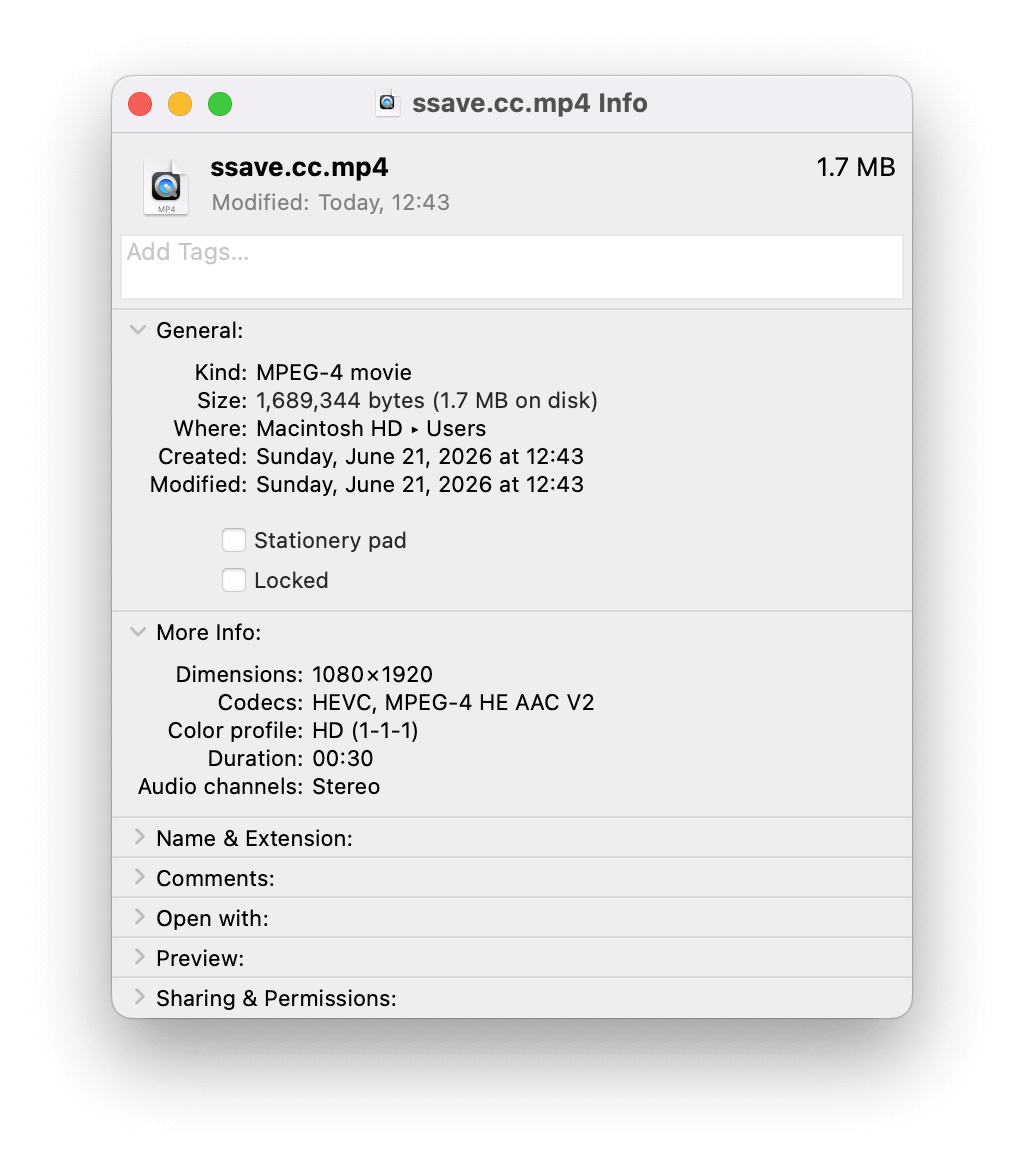
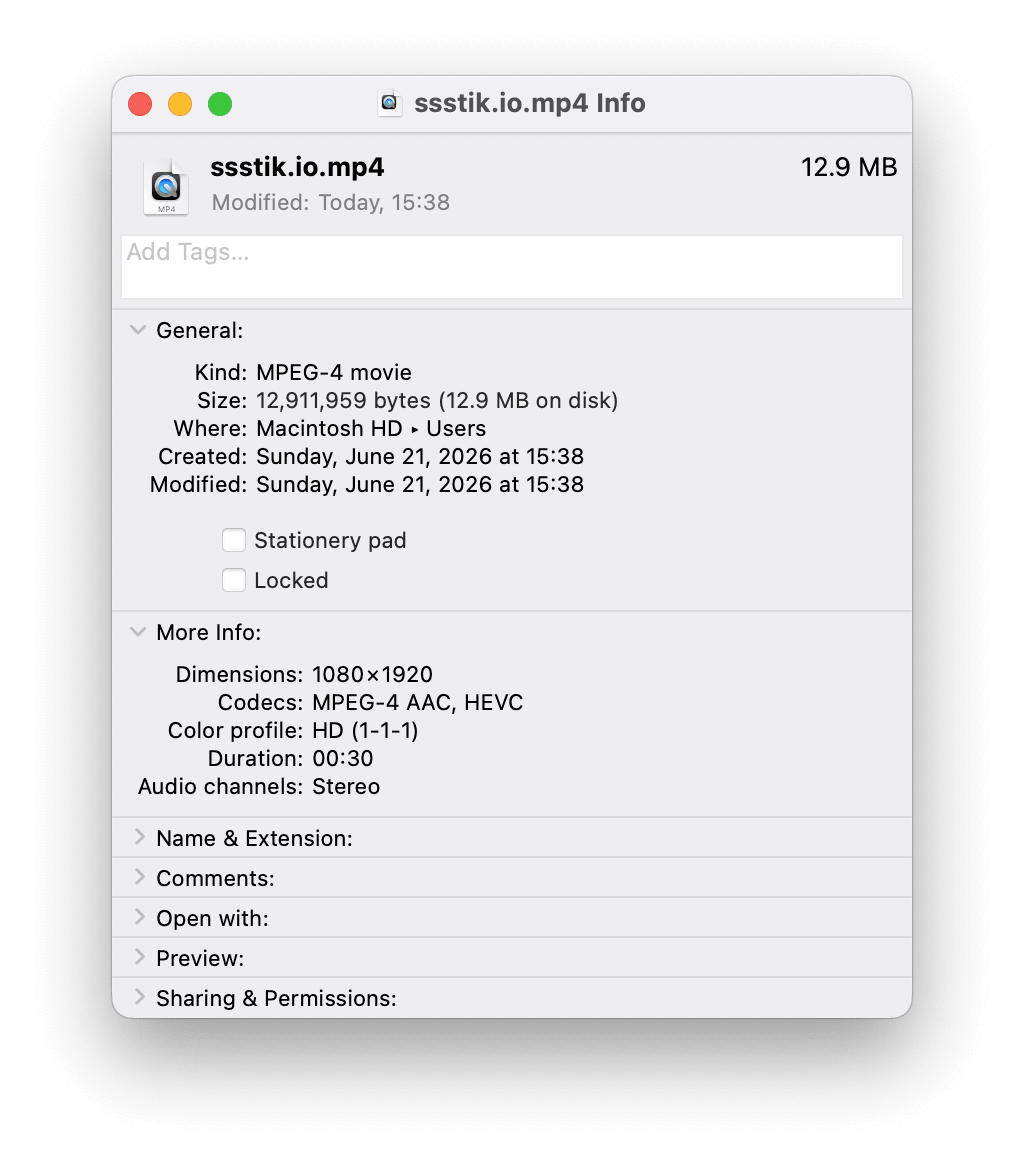
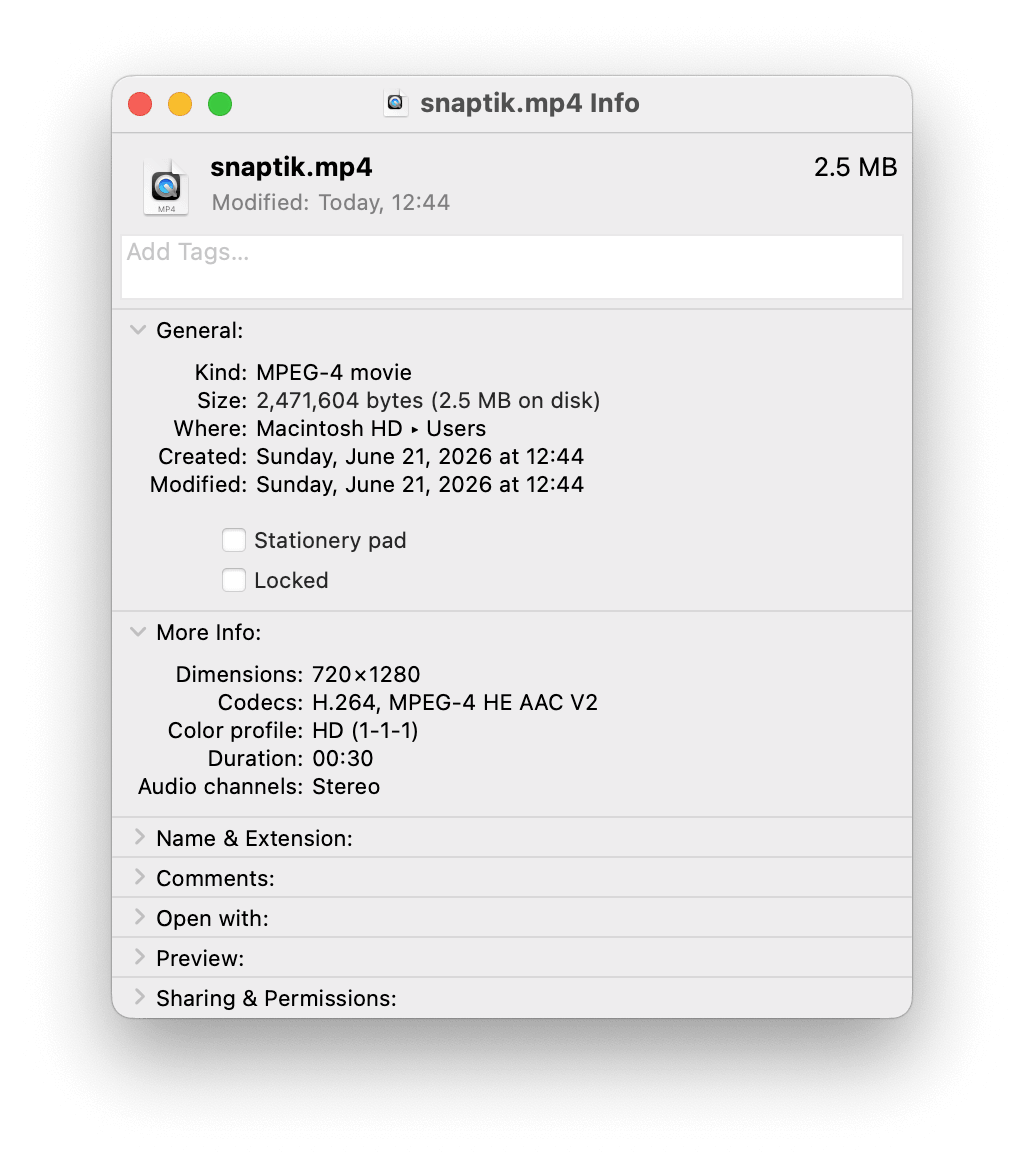
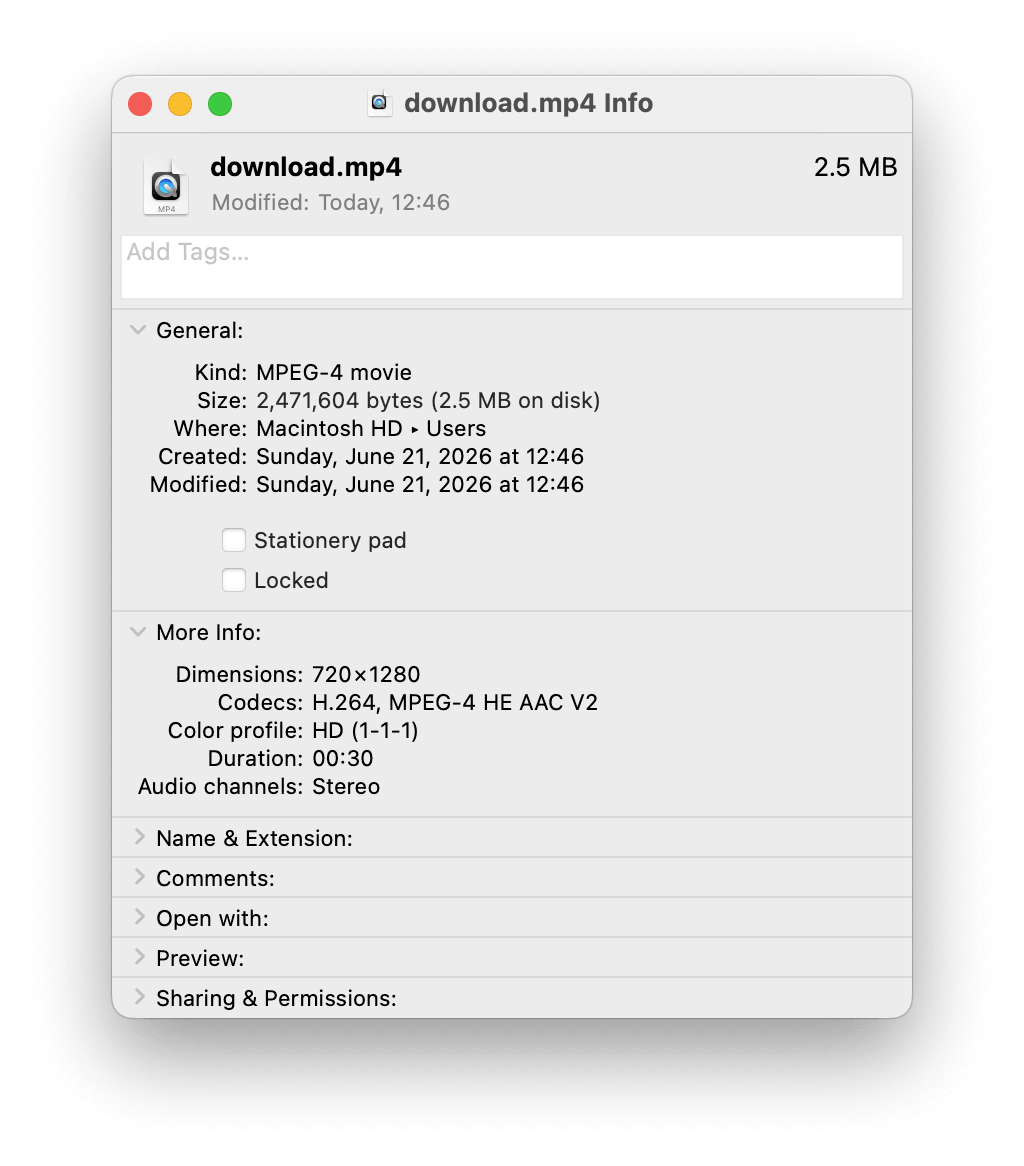
- File-level verification. Instead of just trusting each site's “HD” label, we opened every downloaded file in macOS Finder's “Get Info” panel and checked the actual resolution, codec, and file size — the kind of metadata that doesn't lie.
- Real-world friction. We counted every extra step: pop-ups, forced ad views, manual redirects, anything standing between “click download” and “file saved.”
One honest limitation: our download-speed comparison is based on a single timed pass per tool rather than a large statistical sample, so we're presenting it as a relative ranking rather than precise benchmarks. Everything else below — file size, resolution, codec, and workflow — is directly verifiable from the file metadata itself.
Quick Comparison
What the Files Actually Show
This is the part most TikTok downloader reviews skip: nobody actually opens the downloaded file and checks what's inside it. We did.
Using the identical 30-second test video, here's what each tool actually produced:
| Tool | File Size | Resolution | Codec |
|---|---|---|---|
| ssave | 1.7 MB | 1080×1920 | HEVC |
| SSSTik | 12.9 MB | 1080×1920 | HEVC |
| SnapTik | 2.5 MB | 720×1280 | H.264 |
| Tikup | 2.5 MB | 720×1280 | H.264 |
Below is the file-level verification from our test — we encourage you to repeat this check on your own downloads:
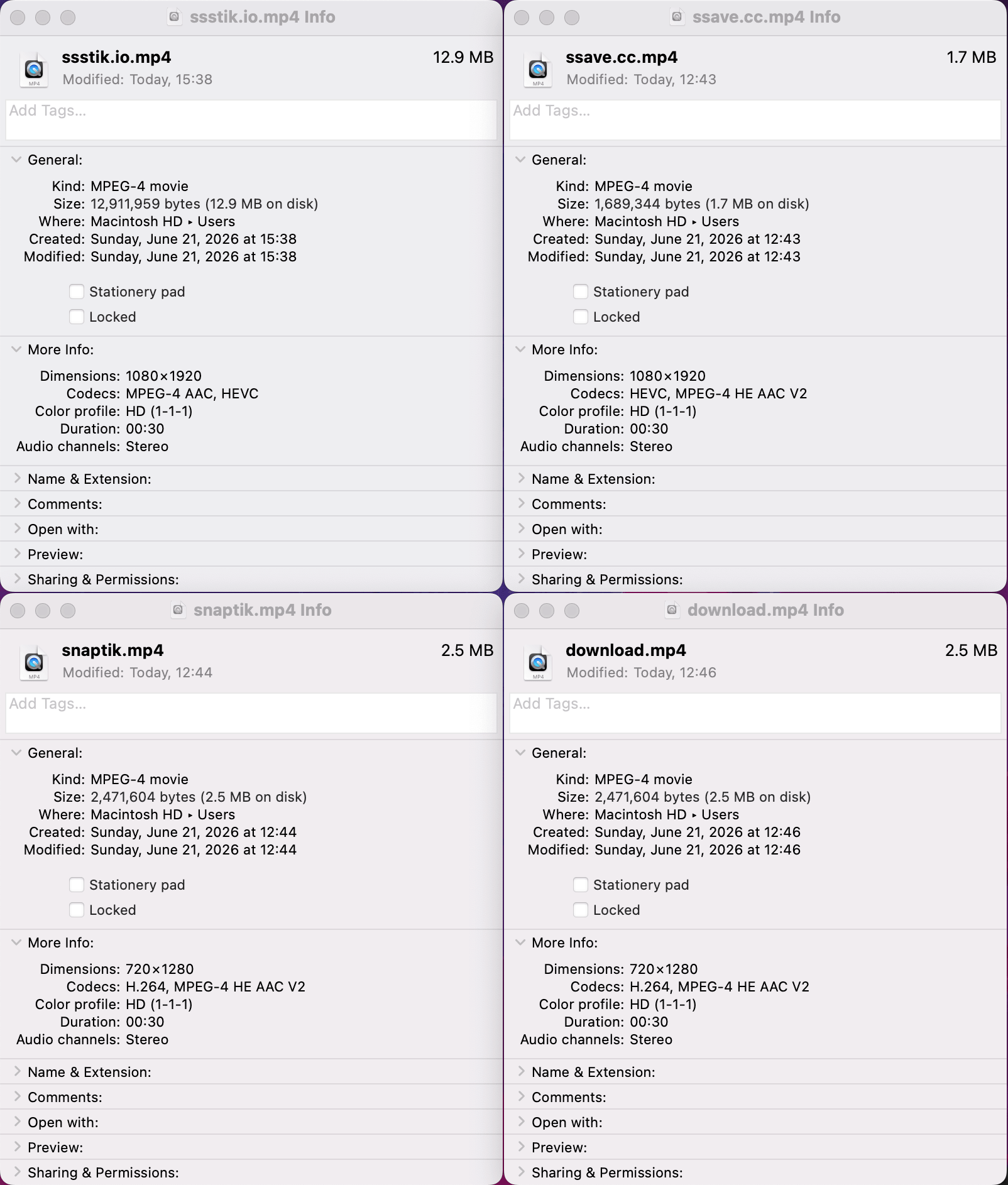
View full screenshots for each tool: ssave · SSSTik · SnapTik · Tikup
Two things stand out here.
First: despite both SnapTik and Tikup labeling their downloads as HD, the actual files they produced were 720×1280 — not the 1080×1920 that the original TikTok video was shot in. SSSTik and ssave were the only two tools that delivered the genuine full-resolution file.
Second: ssave and SSSTik produced files with identical resolution and codec (1080×1920, HEVC) — but ssave's file was roughly 7.6× smaller (1.7 MB vs. 12.9 MB). Same visual quality, same codec, dramatically less storage and bandwidth used. For anyone downloading on a metered connection or saving multiple videos, that difference adds up fast.
We're not asking you to take this on faith — open any downloaded file's “Get Info” panel yourself and check the resolution. It takes ten seconds. Full, unedited screenshots from our test are in the appendix below.
Detailed Reviews
1. ssave — Best Overall Experience
Verdict: The only tool in our test with zero pop-ups, zero forced waits, and a verified true-1080p file at a fraction of the size.
Pros:
- No ads, no pop-ups, no forced wait before downloading
- Verified true 1080×1920 HD output (not just labeled HD)
- Smallest file size for equivalent quality — about 7.6× smaller than SSSTik's equivalent-resolution file
- Supports both watermark and watermark-free downloads
- MP3 audio extraction
- Works for both TikTok and Instagram, not just one platform
Cons:
- No subtitle extraction (Tikup currently offers this and ssave does not)
- Newer to the space than SnapTik or SSSTik, so it doesn't yet have the same brand recognition
Best for: Anyone who wants a clean, fast download without sitting through ads — and who also occasionally needs to save Instagram content, not just TikTok. Try ssave free →
2. SSSTik — Fastest Raw Processing, But Makes You Earn It
Verdict: Technically capable and genuinely fast under the hood, but the ad-gated HD download undercuts the experience.
In our test, SSSTik's backend processing was the quickest of the four tools, and it was the only competitor besides ssave to deliver a verified true 1080×1920 file. That's a real strength.
Pros: Fastest raw processing speed; verified true 1080p output; MP3 extraction supported.
Cons: Requires watching a full ad before the HD download unlocks; multiple pop-ups and banner ads; largest file size of the four for equivalent quality (12.9 MB vs. ssave's 1.7 MB).
Best for: Users who don't mind ads and just want the most well-known, battle-tested option.
3. Tikup — Most Features, Most Friction
Verdict: The only tool with subtitle extraction, but the manual CDN redirect makes it the least convenient of the four.
Pros: Subtitle extraction; watermark and watermark-free options; MP3 extraction supported.
Cons: Manual CDN redirect required; actual output was 720×1280 despite advertising HD; TikTok only.
Best for: Users who specifically need subtitle files and don't mind a multi-step download process.
4. SnapTik — Familiar, But Showing Real Limitations
Verdict: A long-standing name in the space, but our file-level check found it falls short of true HD, and it lacks audio extraction entirely.
Pros: Simple, direct download flow with no forced waiting; well-known, widely used.
Cons: Actual output was 720×1280; pop-up ads throughout; no MP3 option; TikTok only.
Best for: Users who only need a quick, low-effort download and don't care about resolution or audio extraction.
Key Features to Look For
If you're choosing a TikTok downloader for yourself, here's what's actually worth checking — based on what our testing revealed actually varies between tools:
- Verify the resolution yourself. Don't trust the “HD” label on the page. After downloading, right-click the file and check “Get Info” (Mac) or “Properties” (Windows).
- Watch for ad-gated downloads. Some tools make the HD version available only after you sit through an ad.
- Count the extra steps. A tool that requires a manual redirect to a separate page adds friction even if it eventually works.
- Check platform coverage. If you regularly save content from more than just TikTok, a single-platform tool means juggling multiple downloaders.
- MP3 support, if you need it. Not every tool offers audio-only extraction — confirm before you need it urgently.
FAQ
Is it safe to use TikTok downloaders?
It depends on the specific site. Web-based tools that don't ask you to install software are generally lower-risk than browser extensions or anything requesting a downloadable installer. Be cautious of sites with aggressive redirects or pop-ups disguised as download buttons.
Is downloading TikTok videos legal?
Saving a video for personal, offline viewing is generally considered acceptable. Re-uploading or distributing someone else's content as your own, without the creator's permission, can violate copyright. When in doubt, ask the creator or keep downloads for personal use only.
Why does a video labeled “HD” turn out to be 720p?
Some downloader tools cap their output resolution regardless of the source video's actual quality, while still labeling the result “HD” in their interface. The only way to know for certain is to check the file's actual metadata after downloading, as we did in this test.
Can I download TikTok audio as MP3?
Yes, with most of the tools we tested — ssave, SSSTik, and Tikup all support MP3 extraction. SnapTik does not. Try ssave MP3 downloader →
Does any of these tools work for Instagram too?
Of the four we tested, only ssave supports both TikTok and Instagram. The other three are TikTok-only. Try ssave Instagram downloader →
Final Verdict
Every tool in this comparison can technically get you a downloaded TikTok video. The differences show up in what you don't notice until you check closely: whether “HD” actually means HD, whether you're forced to wait through an ad, and how much storage space you're using for the same visual quality.
Based on what we found — true 1080p resolution, the smallest file size for that resolution, zero ads, and support for both TikTok and Instagram — ssave came out as the most consistent all-around option in our test. SSSTik is a legitimate alternative if you don't mind ads and want the fastest raw processing. Tikup is worth considering specifically if you need subtitles. SnapTik remains the simplest option but fell short on both resolution and audio support in our testing.
We'd encourage you not to take any of this — including our own claims about ssave — purely at face value. Download a file, check its metadata, and see for yourself.
Testing Methodology & Raw Evidence
These are the complete macOS Finder “Get Info” screenshots from our test, saved without cropping or retouching beyond redacting unrelated desktop elements. Same 30-second source video, same Wi-Fi connection, same testing session on June 21, 2026.
Jump to a tool: ssave · SSSTik · SnapTik · Tikup